
Dagger 的強大跟好處相信大家可以慢慢能體會到,但實務上有時候我們不需要這麼強大的功能,或者是你覺得 dagger 學習曲線太陡了,這時候 koin 可能是另一個好選擇。
https://github.com/InsertKoinIO/koin
Koin 運用了大量的 kotlin 特性,讓 dependency injection 變成非常符合 kotlin 的風格,使用上也十分簡單。
對 koin 用到的特性有興趣的話,請參考:
Function literals with receiver: https://kotlinlang.org/docs/reference/lambdas.html#function-literals-with-receiver
Extensions: https://kotlinlang.org/docs/reference/extensions.html
Delegated Properties: https://kotlinlang.org/docs/reference/delegated-properties.html
Reified type parameters: https://kotlinlang.org/docs/reference/inline-functions.html
而效能跟其他相似 project 的 performance 比較起來也是蠻不錯的,一般使用可能不會有太大差別: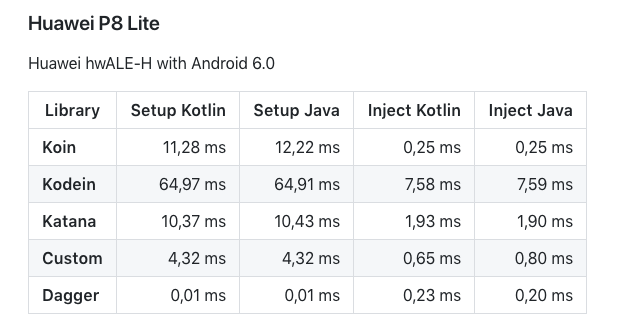
資料來源:https://medium.com/koin-developers/ready-for-koin-2-0-2722ab59cac3
可以看到 dagger setup 真的是超快的,因為使用 annotation processing,所有耗時的工作都在 compile 時做完了。
我們就一起來看 koin 有多麽簡潔優雅吧!
跟以往一樣我們需要宣告 dependency 在 build.gradle:
dependencies {
    implementation "org.koin:koin-core:2.0.1"
    implementation "org.koin:koin-android:2.0.1"
}
我們一樣拿我們之前的 Printer 例子來舉例:
如果沒看過的話,請見:[Android 十全大補] Dagger
interface Wood

interface Water

interface Ink

interface Paper

interface Printer

class MyWood : Wood

class MyWater : Water

class MyInk(val water: Water) : Ink

class MyPaper(val wood: Wood) : Paper

class MyPrinter(val paper: Paper, val ink: Ink) : Printer
我們建立一個 module 來宣告所有可提供的 dependency,koin 提供了 single 跟 factory 二種方法,single 保證每次拿到的物件都是同一個,而 factory 則是每次呼叫都會有個新的物件。
val myModule = module {
    factory { MyPrinter(get(), get()) as Printer }
    single { MyWood() as Wood }
    single { MyWater() as Water }
    single { MyInk(get()) as Ink }
    single { MyPaper(get()) as Paper }
}
get 是個 reified type function,會自動轉換成需要的型別。
比如說 MyPrinter(get(), get()) 第一個 get 回傳的是 Paper 型別、而第二個 get 則會是 Ink 型別。
而 get 的值則會依照需要的型別找到相對應的建構 function,比如說 MyPrinter 的第一個 get 就會找到 MyPaper() as Paper。
as Paper 是不可省略的,因為 MyPaper 需要的型別是 Paper,而在 koin 的世界裡,Paper 跟 MyPaper 是互不相通的。
有了 modules 之後,在我們的 Andoid Application 啟動 koin 如下程式碼:
class MyApplication : Application() {
    override fun onCreate() {
        super.onCreate()
        startKoin {
            modules(myModule)
        }
    }
}
最後在 Activity 或是任何 context base 的 class 就可以用以下方式拿到 dependency 囉:
class MainActivity : AppCompatActivity() {

    val printer: Printer by inject()

    override fun onCreate(savedInstanceState: Bundle?) {
        super.onCreate(savedInstanceState)
        setContentView(R.layout.activity_main)

        val printer: Printer = get()
我們可以直接透過萬用的 get 直接拿到相對應型別的 dependency,或是使用 by inject() 做 lazy loading。是不是很簡單呢?
實際上
get跟inject是ComponentCallbacks的extensionfunction,所以不只 context base,包含Fragment也可以使用喔!
挑戰:
- 請試著使用
Qualifier解決同型別衝突- 請把
PrinterModule拆成多個 module
Koin 跟 dagger 比較起來的話,有以下幾個優點:
而缺點的話:
取捨就靠大家的智慧了,不知道大家比較喜歡哪個 library?
Android 十全大補已經正式出書上架囉!
有興趣的讀者歡迎參考:
https://www.tenlong.com.tw/products/9789864345786


而 get 的值則會依照需要的型別找到相對應的建構 function,比如說 MyPrinter 的第一個 get 就會找到 MyWood() as Wood。
as Wood 是不可省略的,因為 MyPrinter 需要的型別是 Wood,而在 koin 的世界裡,Wood 跟 MyWood 是互不相通的。
以上 MyPrinter 應該是 MyPaper?

是的 感謝糾錯

 iThome鐵人賽
 看影片追技術